Managing daily business operations can be challenging. Employees need to handle sales, inventory, customer enquiries, payments, and reports. When these tasks rely on separate tools or manual processes, work can become slow and difficult to manage.
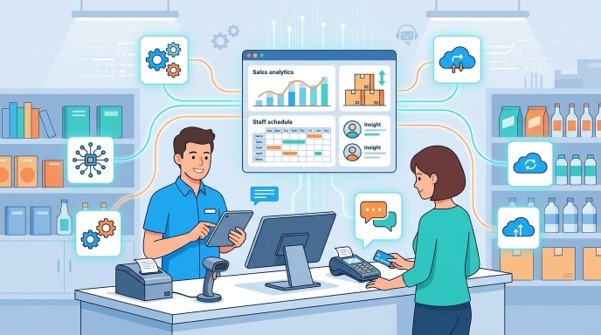
AI automation and Point of Sale (POS) systems can help businesses organise these activities. POS software records sales and supports transaction management. AI automation can handle selected repetitive tasks, analyse business information, and support faster workflows.
When these technologies work together, businesses can connect sales information with other operational processes. This can help teams reduce unnecessary manual work, improve visibility, and make better-informed decisions.
In this guide, we explain how AI automation and POS systems work, their main benefits, the tasks they can support, and how to choose suitable solutions for your business.
What Are AI Automation and POS Systems?
AI automation and POS systems help businesses manage different parts of their daily operations. AI automation uses artificial intelligence to support or automate selected tasks. A POS system records sales transactions and helps businesses manage purchases and related information.
When properly integrated, these technologies can share relevant data and support connected workflows.
What Is AI Automation in Business?
AI automation uses artificial intelligence to perform or assist with tasks that would otherwise require manual effort.
Businesses can use AI tools to organise information, draft customer responses, summarise reports, classify documents, and identify patterns in business data. Some tools can also trigger actions based on defined rules.
For example, an AI-enabled workflow might categorise incoming customer enquiries and direct them to the appropriate team. Another workflow might summarise weekly sales information for a manager to review.
The level of automation depends on the tool, available data, and business requirements. Important decisions and sensitive activities may still require human approval.
What Is a Point of Sale (POS) System?
A Point of Sale system is a combination of software and, in some cases, hardware used to record and manage sales transactions.
A POS system may include a checkout interface, payment processing, product records, inventory tracking, and sales reports. Some systems also support customer profiles, returns, discounts, and employee activity records.
For example, when a customer purchases a product, the POS system records the transaction. If inventory tracking is enabled, the system may also update the available stock quantity.
POS systems are commonly used by retail stores, restaurants, cafés, and other businesses that process customer transactions.
How Are AI Automation and POS Systems Different?
AI automation and POS systems serve different purposes.
A POS system focuses on recording transactions and managing sales-related activities. AI automation focuses on assisting with tasks, analysing information, and carrying out selected workflows.
For example, a POS system may record which products sold during the day. An AI tool may analyse that sales information to identify patterns or prepare a summary for the business owner.
Neither technology replaces the other. Their value depends on the business processes they support.
Can AI Automation Work With a POS System?
Yes. AI automation can work with a POS system when compatible integrations, APIs, or data connections are available.
A business could use POS sales data to prepare automated reports, flag unusual changes in sales, or support inventory planning. The exact capabilities depend on the POS platform, AI tools, data quality, and integration setup.
Businesses should confirm compatibility before purchasing software. They should also establish appropriate permissions and review automated outputs before acting on important recommendations.
How Does AI Automation Help Businesses Streamline Daily Operations?
AI automation helps businesses reduce selected repetitive tasks, organise information, and support decision-making. It can be useful when employees spend considerable time handling routine administrative work.
Automating Repetitive Administrative Tasks
Many businesses perform the same administrative tasks every day. Employees may organise documents, update records, prepare summaries, and transfer information between applications.
AI automation can assist with some of these activities. For example, a workflow might extract information from documents, classify incoming requests, or prepare a draft report.
This can reduce repetitive work and allow employees to focus on tasks that need judgement or personal attention.
Before automating a process, businesses should review how it works. Clear procedures and reliable data help reduce mistakes.
Improving Customer Communication and Follow-Ups
Customer enquiries can arrive through email, website forms, chat, and other channels. Managing every enquiry manually may become difficult as a business grows.
AI tools can help categorise enquiries, suggest responses, and direct messages to the appropriate team. Automation can also send approved reminders or follow-up messages based on defined conditions.
For example, a business might send a customer a confirmation after an order is recorded.
Customer communication should remain accurate and appropriate. Businesses should review automated messages and provide a way for customers to contact a person when needed.
Analysing Business Data for Better Decisions
Business data can reveal useful patterns, but reviewing large amounts of information manually takes time.
AI-enabled analytics tools can help summarise sales reports, highlight unusual changes, and identify patterns that deserve further investigation.
For instance, a retailer might compare weekly sales figures to identify products with changing demand.
These findings can support planning, but they should not be treated as guaranteed predictions. Managers should consider business conditions, data quality, and other relevant information before making decisions.
Reducing Manual Data Entry and Process Errors
Entering the same information into multiple applications increases administrative work and creates opportunities for mistakes.
Automation can transfer supported information between connected systems, populate forms, or prepare records for review.
For example, an integrated workflow may transfer selected order details from one application to another without requiring an employee to enter them again.
Businesses should test these workflows carefully. Incorrect mappings, duplicate records, or failed integrations can still cause problems. Monitoring and exception handling remain important.
Supporting Smarter Workflows With AI Tools
AI automation can support workflows that involve several steps.
A business might receive an enquiry, classify its subject, assign it to the relevant team, and notify the responsible employee. Each action can follow defined rules, with AI assisting where appropriate.
These workflows can help teams organise tasks and respond more consistently.
The best starting point is usually a repetitive, well-defined process. Businesses can test the workflow, measure the results, and expand automation when it proves useful.
How Do POS Systems Improve Daily Business Operations?
POS systems help businesses record transactions, manage sales information, and coordinate checkout activities. Depending on the software, they can also support inventory, customer records, and reporting.
Faster and More Organised Sales Transactions
A POS system gives employees a structured way to record purchases, apply eligible discounts, and process supported payment methods.
Product information and pricing can be stored in the system, reducing the need to calculate every transaction manually.
For example, a retail employee can select products, review the total, and complete the sale through the configured checkout process.
The speed of checkout depends on the system configuration, payment provider, hardware, and employee familiarity.
Real-Time Inventory Tracking
POS systems with inventory management features can update stock records as transactions are completed.
This helps businesses monitor product availability and identify items that may need replenishment.
For example, a shop owner may review current stock levels before placing a supplier order.
Inventory accuracy still depends on recording deliveries, returns, damaged products, and other stock movements correctly. Businesses should check whether their chosen POS supports multiple locations, stock transfers, and low-stock alerts.
Centralised Sales Records and Reporting
POS software stores transaction information that businesses can use to review sales activity.
Depending on the system, reports may show revenue, product performance, payment methods, discounts, refunds, and sales by time period.
Managers can use this information to compare performance and identify areas that need attention.
For example, a retailer might compare sales across weekdays and weekends when planning staffing levels.
Reports should be reviewed alongside relevant costs and other business information. Sales figures alone do not show overall profitability.
Better Customer and Purchase Record Management
Some POS systems support customer profiles and purchase histories.
These features can help authorised employees review relevant customer information, process returns, and provide more consistent service.
When permitted and configured appropriately, customer records may also support loyalty programmes and targeted communications.
Businesses should collect only the information they need and protect it through suitable access controls and data handling practices.
Easier Returns, Refunds, and Transaction Tracking
Managing returns and refunds can become difficult when transaction records are incomplete.
A POS system can help employees locate original purchases, record approved refunds, and maintain transaction histories.
This improves record keeping and helps businesses review sales adjustments.
The available controls depend on the software and payment provider. Businesses should configure approval rules and ensure that refunds follow their internal policies.
Support for Multiple Payment Methods
Many modern POS systems support several payment methods, depending on the hardware, software, and payment provider.
These may include cash, eligible debit and credit cards, and supported digital payment options.
Offering suitable payment methods can make checkout more convenient for customers.
Before choosing a POS solution, confirm payment compatibility, processing fees, settlement arrangements, and any hardware requirements.
What Are the Benefits of Combining AI Automation With POS Systems?
Combining AI automation with POS software can help businesses connect sales information with other workflows. The greatest value often comes from reducing manual handovers and making relevant information easier to use.
Connecting Sales Data With Business Workflows
A POS system records sales information. Integrated automation tools can use selected records to trigger other activities.
For example, a completed transaction might update inventory, generate a sales entry, or initiate an approved customer notification.
These connections can reduce repeated data entry when the systems are configured correctly.
Businesses should establish which application is responsible for each record. Clear data ownership helps prevent conflicting updates and duplicate information.
Reducing Repetitive Work Across Departments
Sales information may need to reach inventory, finance, customer service, and management teams.
When these departments use disconnected systems, employees may spend time copying records or requesting updates.
Integrated software can transfer supported information and trigger defined actions automatically.
For example, a daily sales report could be prepared from POS records and sent to a manager for review. This reduces routine preparation while preserving human oversight.
Improving Inventory Planning and Stock Monitoring
Sales data can help businesses understand which products sell quickly and which remain in stock for longer periods.
With suitable integrations, analytics or AI tools can help identify patterns and flag products that may require attention.
For example, a retailer might receive an alert when stock falls below a defined threshold. An analytics tool might also highlight products with changing sales patterns.
These insights can support purchasing decisions, but they do not remove the need to consider supplier lead times, seasonal demand, and available storage.
Understanding Sales Trends and Customer Behaviour
Businesses can use POS records to understand transaction patterns, popular products, and changes in sales over time.
Where suitable data and tools are available, AI-enabled analytics can help summarise these patterns and identify areas for further investigation.
For example, a café might compare product sales across different times of day to review its menu and staffing arrangements.
Businesses should avoid drawing conclusions from incomplete data. Customer privacy and appropriate use of personal information must also remain priorities.
Supporting Faster, Data-Informed Decisions
Managers often need timely information to respond to changing business conditions.
Connected POS and automation tools can make selected reports easier to prepare and review. This may help managers identify stock issues, monitor sales, and investigate unusual transactions.
However, automated reports and AI-generated recommendations should be checked against reliable records.
Human judgement remains important, especially for financial decisions, staffing changes, and other activities with significant consequences.
Improving Operational Visibility as a Business Grows
As a business expands, its transaction volume, customer base, and number of locations may increase.
Connected systems can help maintain consistent records and provide managers with a broader view of operations.
For example, a business with several stores may use compatible POS software to compare sales and stock information across locations.
The right setup depends on the platform, reporting requirements, and integration capabilities. Businesses should plan for additional users and locations when selecting their systems.
Which Business Tasks Can AI Automation and POS Systems Automate?
AI automation and POS systems can support several everyday tasks, although the available functions depend on the selected tools and integrations.
| Business task | POS system role | AI automation role |
| Sales tracking | Records transactions and sales totals | Helps summarise sales patterns |
| Inventory management | Tracks stock movements where supported | Helps flag replenishment needs |
| Customer service | Stores relevant transaction records | Helps classify enquiries and draft responses |
| Reporting | Provides sales and transaction reports | Summarises selected information |
| Administration | Organises sales records | Automates supported repetitive workflows |
| Customer notifications | Records relevant order details | Sends approved messages through configured workflows |
Sales Recording and Daily Reconciliation
POS systems can organise transaction records, while connected automation may help prepare summaries for review.
Financial reconciliation should still follow appropriate accounting procedures. Businesses should investigate discrepancies rather than relying solely on automated summaries.
Stock Updates and Low-Inventory Alerts
A connected POS and inventory system can update stock records as sales occur. Defined rules can trigger alerts when stock reaches a specified level.
More advanced analytics may help identify changing demand, but businesses should validate recommendations before changing purchasing plans.
Customer Notifications and Follow-Ups
Businesses can configure approved messages for order confirmations, collection notifications, and other relevant events.
AI tools may also help prepare customer response drafts. Messages should be accurate, relevant, and consistent with customer communication preferences.
Sales Summaries and Performance Reports
POS data can support daily, weekly, and monthly reports. Automation can help prepare these summaries and deliver them to authorised employees.
Managers should review the figures, confirm their accuracy, and consider the context before acting on the results.
Which Businesses Can Benefit From AI Automation and POS Solutions?
These technologies can support different business types, but their usefulness depends on transaction volume, operational challenges, and existing systems.
Retail Stores and Supermarkets
Retailers can use POS systems to record purchases, monitor stock, and review product sales.
AI automation may help summarise sales trends, organise customer enquiries, or flag products that need attention.
For example, a shop owner could use stock alerts to review replenishment needs before popular products run out.
Restaurants, Cafés, and Food Businesses
Restaurants and cafés can use POS systems to manage orders, record payments, and review sales performance.
Depending on the platform, POS software may also support table management, kitchen order workflows, and menu reporting.
AI tools can assist with sales summaries, customer enquiries, and selected administrative tasks. Businesses should confirm that the system supports their ordering and payment requirements.
E-Commerce and Omnichannel Retailers
Businesses selling online and in physical stores often need consistent product and inventory records.
Compatible POS, e-commerce, and inventory systems can help connect sales information across channels.
AI automation may support customer enquiry classification, report preparation, and selected order-related workflows.
Businesses should verify that integrations keep stock, pricing, and order records consistent across platforms.
Wholesalers and Distribution Businesses
Wholesalers and distributors often manage large product catalogues, supplier orders, and inventory movements.
POS software may be suitable for certain sales environments, while ERP or inventory systems may be more appropriate for complex wholesale operations.
AI automation can assist with document processing, reporting, and selected order workflows where the necessary integrations exist.
The system should match the company’s actual processes rather than relying on a one-size-fits-all approach.
Growing Small and Medium-Sized Businesses
Growing businesses may find that manual processes become harder to manage as transaction volumes increase.
POS software can organise sales records, while AI automation can support repetitive administrative tasks.
Businesses should begin with their most pressing operational challenges and expand their software capabilities as requirements develop.
How to Choose the Right AI Automation and POS Solutions
Choosing suitable software requires a clear understanding of your business needs. A system with many features may not be the right choice if it does not support your daily workflows.
Identify Your Current Operational Challenges
Review the tasks that consume the most time or create frequent errors.
These may include slow checkout processes, inconsistent stock records, repeated data entry, or delays in preparing reports.
Ask employees which problems affect their work most often. Use this information to create a prioritised list of requirements.
Compare Essential POS Features
Consider the functions your business needs, such as transaction recording, inventory tracking, sales reports, returns management, and payment processing.
Retailers may prioritise barcode scanning and multi-location stock control. Restaurants may need order management and kitchen integration.
Confirm which features are included in the proposed plan and which require additional hardware or fees.
Check AI Capabilities and Integration Options
Identify the tasks you want AI automation to support.
Check whether the tools can connect to your POS, CRM, ERP, accounting software, or other existing applications.
Ask about data formats, integration costs, security controls, and the handling of failed workflows.
Avoid assuming that a product labelled as AI-powered will automatically support every business process.
Review Data Security and Access Controls
POS and business automation tools may process financial, customer, and employee information.
Review user permissions, authentication, data retention, backups, and available audit records. Understand how the provider handles information sent to third-party AI services.
Limit access to sensitive information and establish clear rules for reviewing automated actions.
Consider Pricing, Training, and Ongoing Support
Compare subscription fees, transaction charges, hardware costs, integration work, and ongoing maintenance.
Also consider the time employees need to learn the system and the support available when problems occur.
Request a clear breakdown of initial and recurring costs. A realistic budget should include implementation and training, not just the software subscription.
Choose Tools That Can Support Future Growth
Consider whether the system can accommodate additional users, products, locations, and business applications.
Ask about data export, integration limits, upgrade options, and the process for changing providers.
Choosing flexible software can help reduce future disruption, but the platform should still meet your current needs and budget.
What Challenges Should Businesses Consider Before Automating Operations?
AI automation and POS systems can improve workflows, but successful implementation requires planning. Businesses should understand the potential risks before introducing new technology.
Integration With Existing Business Software
Not every POS system connects easily with every AI, CRM, ERP, or accounting platform.
Differences in data formats and system capabilities can create additional work.
How to address it: Confirm compatibility before purchasing. Test important workflows and establish how information will move between systems.
Inaccurate or Incomplete Business Data
AI tools may produce misleading summaries when the underlying data is incomplete or incorrect. POS records can also become inaccurate when transactions, returns, or stock movements are not recorded properly.
How to address it: Clean existing records, establish data standards, and review important outputs against reliable sources.
Employee Training and Adoption
Employees may struggle when a new system changes familiar processes.
How to address it: Provide practical, role-specific training. Explain the purpose of the changes and give employees a way to report problems.
Data Privacy and Security Risks
Automated workflows may process sensitive customer, financial, or employee information.
How to address it: Apply suitable access controls, review provider policies, limit unnecessary data sharing, and ensure that automated workflows follow relevant privacy requirements.
Software Costs and Ongoing Maintenance
Subscriptions, integrations, training, and technical support can increase the total cost of ownership.
How to address it: Set a budget, compare providers, and identify the business outcomes you want to measure before committing to a system.
Why Human Oversight Still Matters
AI-generated summaries, predictions, and recommendations can contain errors. Automated processes may also fail when information is missing or unusual situations arise.
How to address it: Establish approval steps for important decisions, monitor automated workflows, and make sure employees can investigate exceptions.
How Can Businesses Implement AI Automation and POS Systems Successfully?
A structured implementation process helps businesses introduce new tools while managing operational risks.
Step 1 — Review Existing Business Processes
Document how sales, inventory, customer service, reporting, and administration currently work.
Identify duplicate tasks, manual handovers, and frequent errors. This helps establish where new technology may provide practical value.
Step 2 — Set Clear Operational Goals
Choose measurable objectives, such as reducing time spent preparing reports, improving inventory record accuracy, or simplifying transaction processing.
Record the current performance level so you can compare results after implementation.
Step 3 — Select Compatible Software
Compare POS and AI automation solutions against your requirements.
Check essential features, integration options, security controls, pricing, and support arrangements.
Ask providers to demonstrate realistic workflows rather than relying only on product descriptions.
Step 4 — Configure Systems and Integrations
Set up product records, pricing, user permissions, inventory rules, and reporting requirements.
Configure the required connections between POS software and other applications. Test how records move between systems and decide how failed transactions will be handled.
Step 5 — Train Employees and Test Workflows
Train employees on the tasks they will perform. Test common transactions, returns, stock updates, reporting, and automated notifications.
Review errors before launch and make sure employees know when they need approval or assistance.
Step 6 — Monitor Performance and Improve Processes
After launch, measure the results against your original goals.
Useful indicators include transaction processing time, stock discrepancies, reporting time, administrative workload, and workflow errors.
Gather employee feedback and review automated outputs. Improve the configuration when results do not meet expectations.
How Can Hassle Free Care Help Businesses Improve Their Operations?
Choosing business software can be difficult when different tools handle sales, customer records, finances, and daily workflows. The right solution should fit your existing processes and support your operational priorities.
Hassle Free Care offers business technology services covering AI automation and POS solutions, alongside CRM solutions, ERP solutions, accounting software, and staff augmentation.
Depending on your requirements, these services can be considered together to identify suitable ways to connect business systems and simplify selected workflows.
Before selecting a solution, assess your current tools, integration needs, security requirements, and budget.
Looking to simplify your daily business operations? Contact Hassle Free Care to discuss your AI automation and POS requirements and explore suitable options for your business.
Final Thoughts
AI automation and POS systems can help businesses organise daily operations, manage sales information, and reduce selected repetitive tasks. POS software provides structured transaction records, while AI automation can help turn relevant information into useful summaries and workflows.
The best results depend on selecting compatible tools, maintaining accurate data, training employees, and monitoring performance. Businesses should also consider integration costs, data privacy, and the need for human oversight.
Start by identifying the tasks that create the most difficulty in your business. Then compare solutions that address those needs and can support your future plans.
Explore Hassle Free Care’s AI automation and POS solutions to discuss your business requirements and find an approach suited to your operations.


Comments are closed